
Enterprise Digital Solutions: How Datapost Scales With Your Business
The challenge with enterprise technology is that complexity tends to grow faster than the problems it solves. Managing separate vendors for signage, queue management, kiosks, and analytics means separate contracts, separate support relationships, and data that lives in silos.
Datapost's full-suite model addresses this directly. Because all modules are built to work within the same ecosystem, there are no integration fees between tools, no inconsistencies between reporting systems, and no need to coordinate multiple vendors when something needs to change.
Your team manages everything from one platform, with role-based access controls that allow different users. Applicable to marketing managers to IT administrators to branch staff, our ecosystem allows teams to work within their own scope without affecting the rest of the system.
From a single screen to a national network — here's how Datapost's integrated digital solutions are built to meet the demands of enterprise operations.
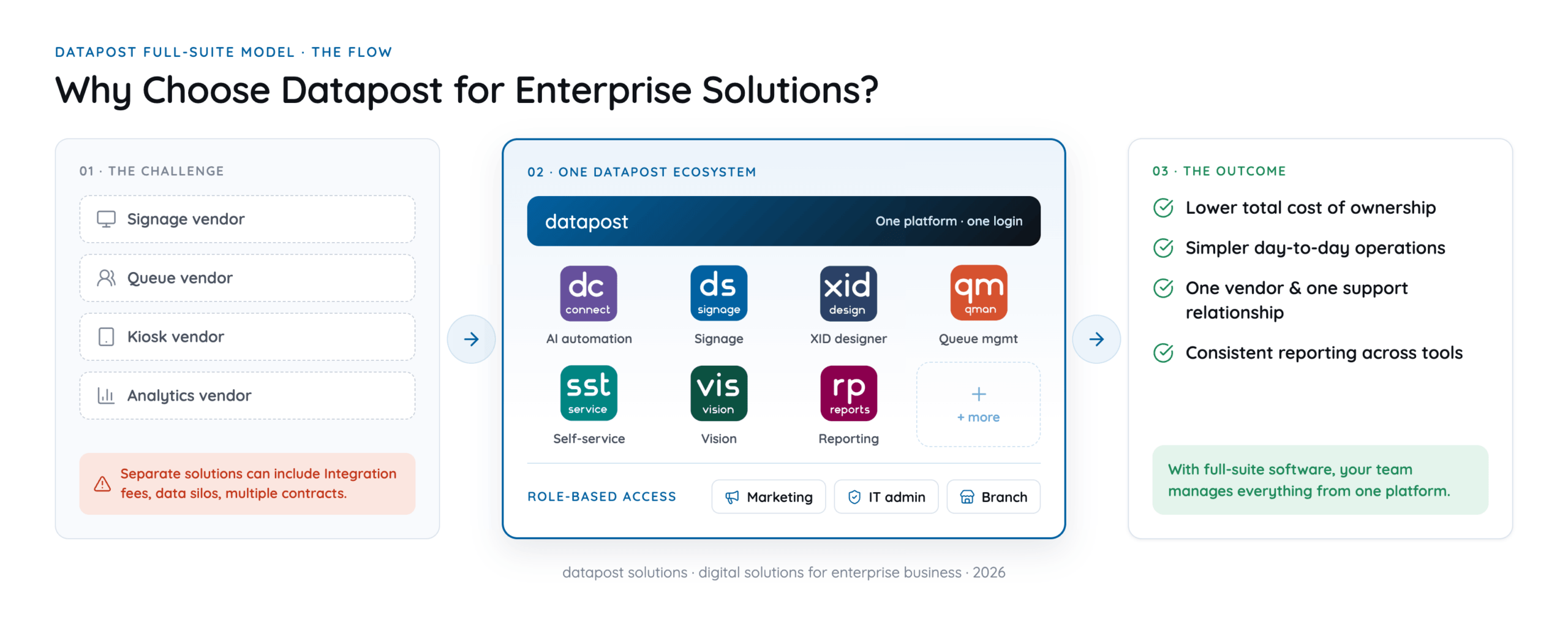
For enterprise businesses, this reduces the total cost of ownership and simplifies day-to-day operations significantly.
One Platform with Multiple Solutions. No Unnecessary Complexity
Enterprise operations don't stay static. New branches open, service requirements change, and customer expectations shift. Your digital infrastructure needs to grow with you instead of becoming a bottleneck.
Datapost is designed with a modular architecture that lets businesses start with what they need and expand over time. A typical growth path might look like this:
- Start with digital signage to improve in-store communication.
- Add queue management as customer volumes grow.
- Introduce self-service kiosks to reduce queue pressure and increase order accuracy.
- Integrate camera vision analytics to understand how customers move through your space.
- Connect everything to a centralised reporting module for unified business intelligence.
Each new module integrates seamlessly with what's already in place. There are no costly system replacements, no data migrations, and no disruptions to existing workflows. This protects your initial investment while giving your enterprise the flexibility to evolve.
Data-Connect: The AI-Driven Automation Layer
While competitors have been building toward AI-native architecture as a future ambition, Datapost’s ecosystem was designed this way from the start.
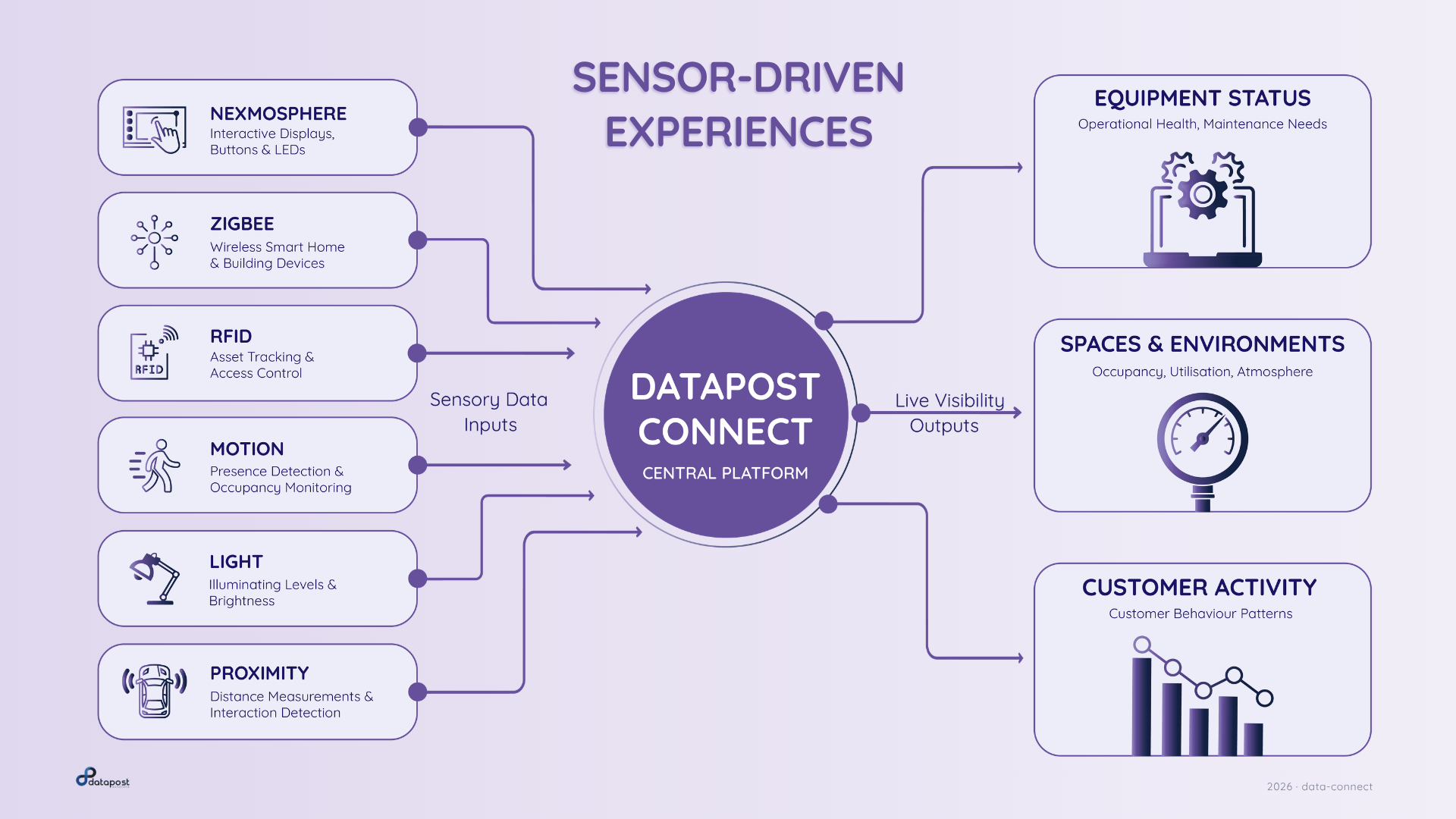
Data-Connect is the AI and automation layer that sits across the entire platform — listening to conditions across your physical and digital environment, applying conditional logic, and pushing the right action to the right system in real time. It isn’t a recent addition; it’s how the Datapost ecosystem was designed.
In practice, Data-Connect is an event-driven automation engine. It monitors inputs, evaluates conditions using a visual logic builder, and triggers outputs across every connected system simultaneously. No developer resources required. Marketing, operations, and store teams build and modify workflows themselves using a drag-and-drop interface.
This cross-system coordination is what separates a connected enterprise operation from one that still relies on manual coordination and scheduled content. Conditions change in real time, and our digital infrastructure will reflect that.
Headless Application Deployments
It is also worth noting what Data-Connect makes possible beyond screen-based workflows: it supports headless application deployments, where the automation logic runs independently of any display. This means the same conditional intelligence (monitoring queue states, inventory levels, sensor inputs, or booking data) can drive back-end workflows, send notifications, update external systems, or log data to a reporting database, without a screen ever being in the chain.
Most digital systems can display content on a schedule. Data-connect does something fundamentally different — it connects every product in the Datapost ecosystem, listens to conditions across your physical and digital environment, applies logic, and pushes the right action to the right system automatically.
Think of it as the intelligence layer that sits behind your screens, kiosks, queue system, and sensors. Without it, each tool operates independently. With it, they work together as a single, responsive operation.
How Data-connect works
Data-connect is what allows Datapost's individual solutions to behave as a unified platform rather than a collection of separate tools. Qman feeds queue data in. XID receives content triggers. Vision sensors inform what promotions are relevant based on space usage or demographics. Kiosk interactions update what screens display. The Reporting Module captures the outcome of every automated action.
Data-connect follows a straightforward model: inputs in, logic applied, outputs out.
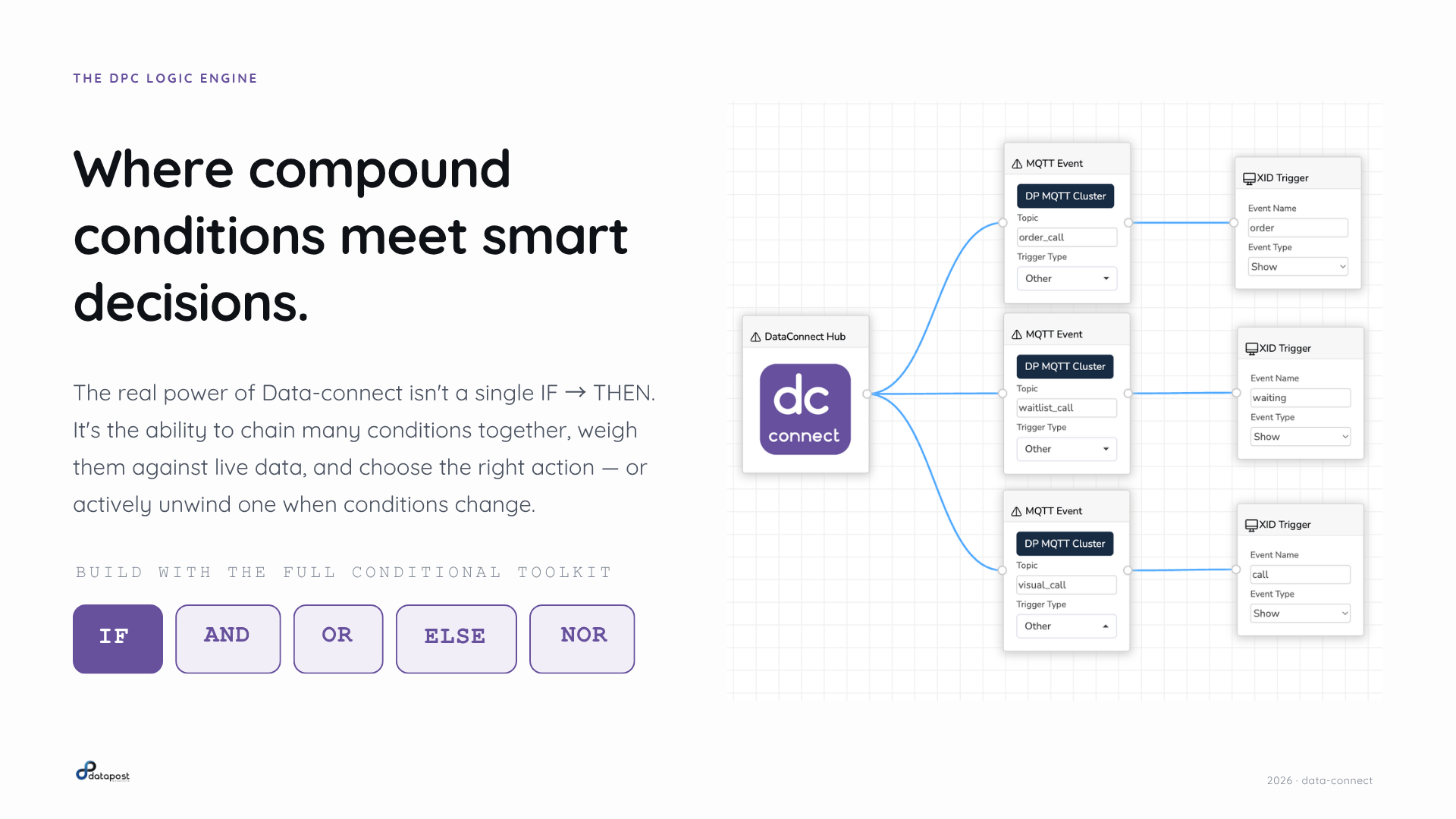
Inputs can come from anywhere: Qman queue data, Datapost Kiosk activity, Datapost Vision audience sensors, XID signage triggers, POS systems, inventory feeds, weather APIs, motion and RFID sensors, WhatsApp messages, or booking calendars. If it produces a signal, Data-connect can read it.
Logic is applied using a visual, drag-and-drop workflow builder. You can chain conditions using IF, AND, OR, ELSE, and NOR operators — from a simple single trigger to a compound, multi-variable decision tree. No developers required. Marketing, operations, and store teams can build and modify workflows themselves.
Outputs are pushed simultaneously across every connected system; screens, kiosks, queue displays, POS terminals, prep station dashboards, email, WhatsApp, and reporting databases.
What this looks like in practice
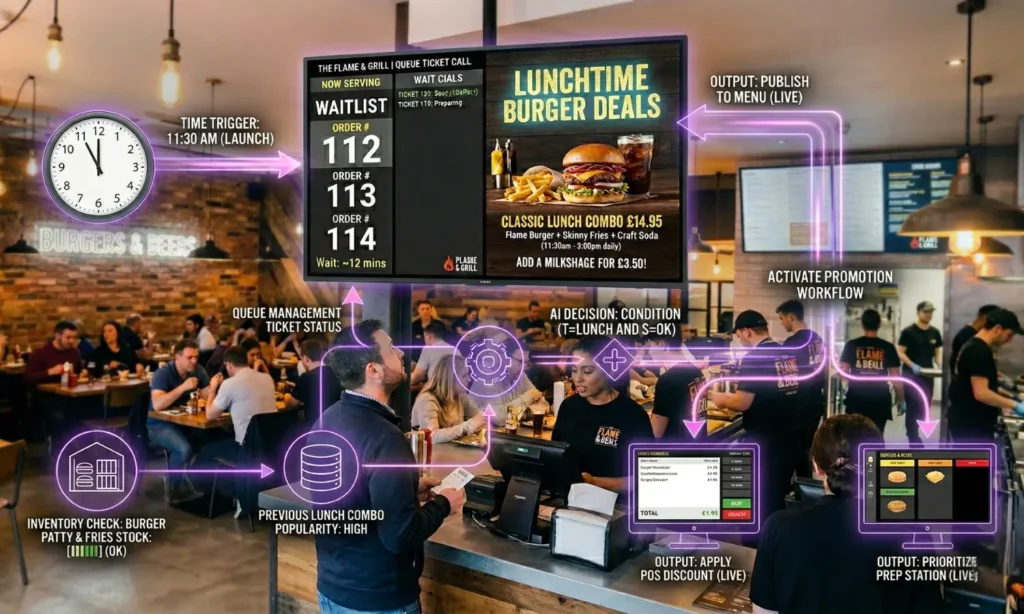
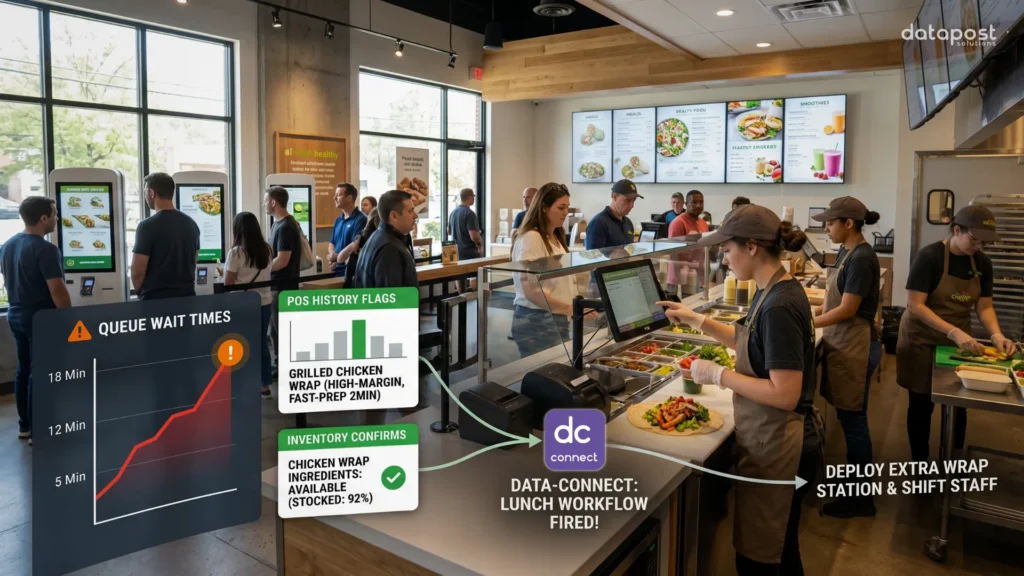
QSR lunch rush, automated end-to-end:
Queue data shows wait times climbing. POS history flags a high-margin, fast-prep dish. Inventory confirms ingredients are available. Data-connect fires the workflow: the dish is promoted on customer-facing screens and the digital menu, a discount is applied at POS, and the prep station is notified to prioritise it. If stock runs out mid-rush, the promotion removes itself automatically.
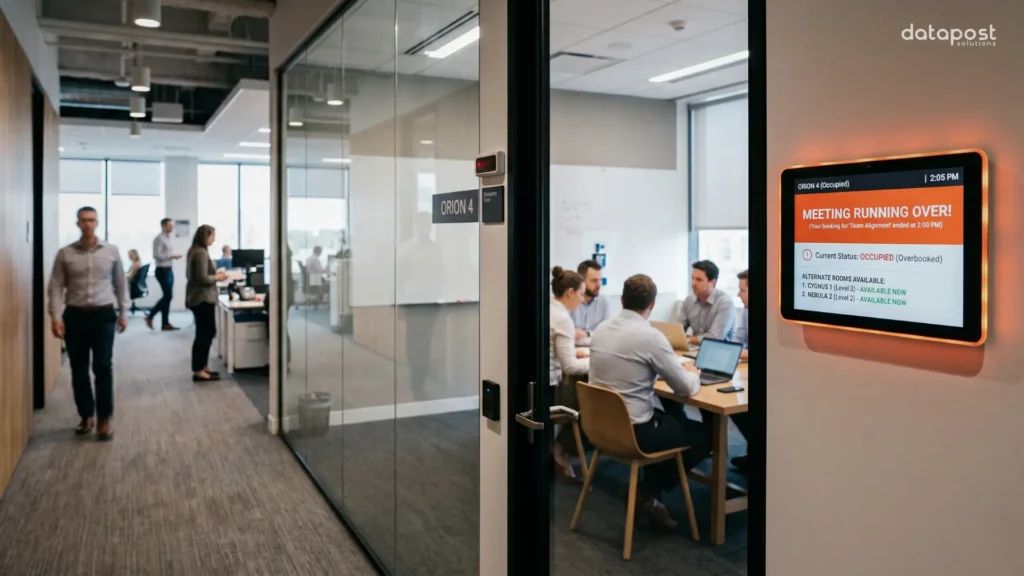
Corporate meeting rooms that manage themselves:
A sensor detects that a meeting has run over its booking. The screen outside updates to "occupied: running over." The next booker receives a WhatsApp notification. When the room empties, the screen resets and announces the next meeting. Utilisation data is logged for facilities analytics. No one had to intervene at any point.
Centralised Control Across Every Screen and Location

For enterprise businesses, the biggest operational risk in digital signage isn't the hardware — it's the lack of visibility and control. Screens displaying outdated promotions, inconsistent branding across branches, and time-consuming manual updates are common problems at scale.
Datapost's enterprise digital signage platform gives you centralised control over your entire screen network from a single dashboard. You can update content across hundreds of locations instantly, schedule campaigns in advance, and monitor every screen's status in real time — without needing to send anyone on-site.
For example, a franchise network launching a national promotion can push updated visuals to every branch simultaneously, with the confidence that every screen is displaying the correct, current content.
This is what enterprise-grade content management looks like: fast deployment, consistent messaging, and zero reliance on USB sticks or manual processes. To understand what sets a powerful signage platform apart, see our blog on the 8 best features for digital signage software.
XID: Our Native Design Tool with Data Integration
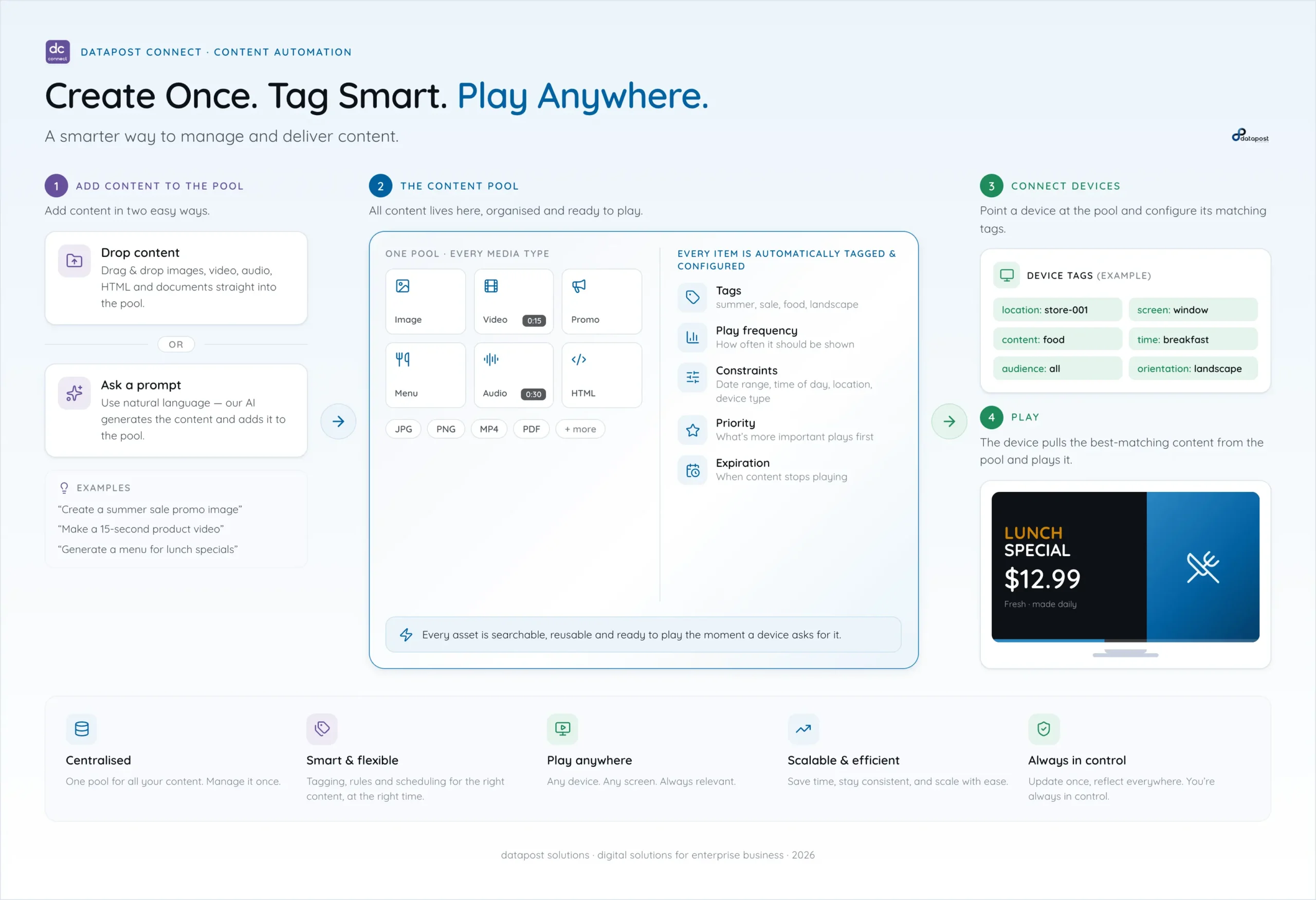
One of the capabilities that sets Datapost apart at enterprise scale is XID Interactive Design — the native content design and data integration tool built directly into the platform.
Where most enterprise signage platforms require external design software or developer resources to produce dynamic content, XID lets marketing and operations teams create, update, and publish directly from the dashboard. Templates, live data widgets, custom tickers, and interactive layouts are all created without leaving the system.
What makes XID particularly powerful at the enterprise level is its API integration capability. XID can pull live data from any accessible feed — POS systems, inventory platforms, booking calendars, financial data, business statistics — and surface it as structured, branded content on screen. If you have the data, XID can present it.
For multi-branch enterprises, this means screens can display location-specific, real-time content without any manual intervention. A branch running a local promotion, a head office displaying live performance data, and a service counter showing queue status can all be managed from a single platform, each pulling relevant data automatically.
XID also supports a custom script editor for advanced users who need to build bespoke widgets, animations, or data dashboards that go beyond what templates offer. This gives enterprise IT and development teams the flexibility to extend the platform without requiring a separate toolchain.
Integrated Systems That Work Together
Most enterprise businesses already use multiple platforms — booking systems, POS software, CRM tools, and more. The problem is that these systems rarely share data, which means your digital displays can only show static content rather than responding to what's actually happening in your business. Datapost connects with your existing systems through API integrations via XID, turning your screens into live, data-driven communication tools.
Here are a few practical examples of how this works in enterprise environments:
Queue management integrated with digital signage:
When a customer takes a ticket at a bank branch, nearby screens can automatically display content relevant to the service they're waiting for — product information, service explanations, or personalised messages. This keeps customers informed and reduces perceived wait times. See how Qman works in financial services environments.
POS and menu board integration for QSR:
Quick-service restaurants can sync their digital menu boards directly with their POS system. When a menu item sells out or pricing changes, the update reflects on-screen automatically with no manual edits required. Read more about digital solutions for QSR.
Self-service kiosks with signage:
Kiosk interactions generate data that can inform what content plays on adjacent screens, creating a more coherent and relevant customer experience.
IoT and building management:
In corporate environments, smart sensors can trigger automated content changes — for example, switching screens to emergency alerts during a fire alarm, or adjusting messaging based on occupancy levels. Learn more in our blog on the connected corporate office.
The result is a digital environment that adapts in real time, rather than broadcasting the same pre-scheduled content regardless of context.
Consolidated Analytics Across Your Entire Operation
For enterprise decision-makers, data is most useful when it's consolidated and actionable. When each system produces its own reports in isolation, leadership teams spend more time reconciling information than acting on it.
Datapost's Reporting Module brings together data from across the entire platform — signage engagement, queue metrics, kiosk usage, and camera vision analytics — into a single reporting environment.

This means you can:
- Measure how specific promotions are performing across locations
- Track queue wait times and service efficiency across branches
- Identify which screens or locations are generating the most engagement
- Compare campaign ROI alongside operational data
For enterprise businesses with multiple locations, this level of unified visibility is the difference between making decisions based on gut feel and making them based on real performance data.
Advanced Audience Measurement for Enterprise Businesses
Datapost Vision, the platform’s anonymous camera analytics tool, goes beyond basic audience measurement. It provides actionable data across two broad categories: people detection and object detection. All collected data is anonymised for compliance with data regulations.
People detection capabilities include:
- Dwell time and attention pattern analysis — understanding how long people engage with specific screens or areas
- Foot traffic flow — mapping how customers move through a space to inform layout, staffing, and content placement decisions
- Audience measurement — aggregated demographic data that helps teams understand who is seeing their content and whether it’s performing.
Object detection extends these capabilities into physical environments and operational workflows:
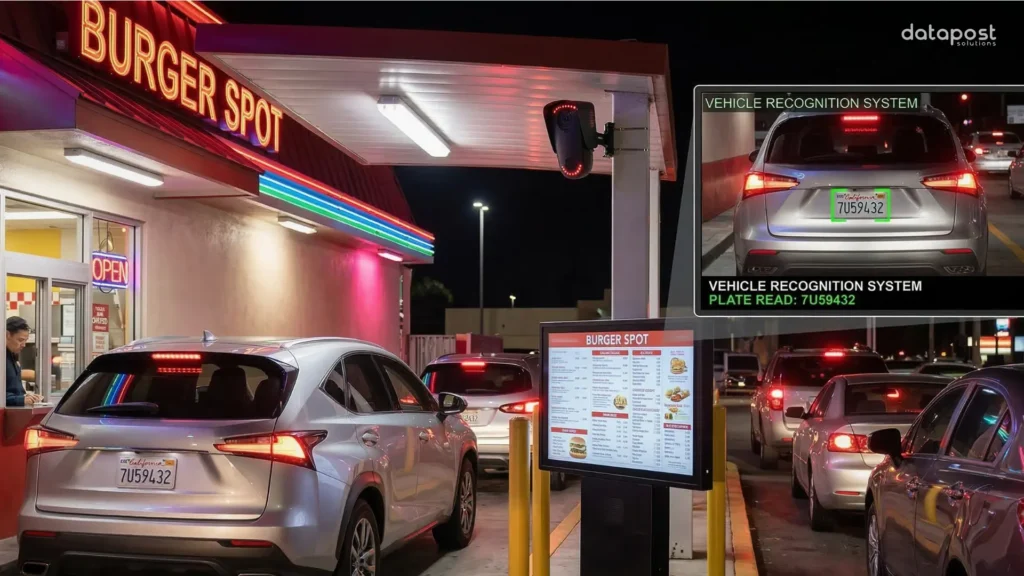
Vehicle detection — in drive-through lanes, Datapost Vision can detect vehicle presence and trigger content changes on menu boards or ordering screens automatically, reducing wait times and improving order flow. The same logic applies to QSR drive-through environments, truck stops, and high-traffic outdoor digital billboard locations where audience and traffic volume data improves ad targeting and scheduling.
All Vision data flows directly into the Datapost Reporting Module, where it sits alongside signage, queue, and kiosk data for a unified operational view. Insights are aggregated and privacy-compliant — Vision measures and counts without identifying individuals.
Built for the Industries That Demand Reliability
Datapost's enterprise digital solutions are deployed across some of the most demanding operating environments. In each of these contexts, the platform's enterprise-grade reliability ensures that critical communications stay live and up to date, even at scale.
- Retail and Franchise Networks: Manage consistent brand communication across every location. Schedule seasonal campaigns centrally, localise content at branch level, and monitor compliance from head office. Learn more about our solutions for retail businesses.
- Financial Services: Display compliant, up-to-date product information across branch networks. Integrate queue management to improve service flow and customer experience in high-footfall environments. See our financial services solutions.
- Quick-Service Restaurants: Synchronise digital menu boards with kitchen systems, run time-sensitive promotions, and use drive-through integrations to increase average order value. Read our blog on the hidden power of the drive-thru and explore our QSR solutions.
- Corporate Communications: Turn office screens into live information hubs — displaying KPIs, operational updates, visitor welcome messages, and emergency alerts from a single platform. Our blog on digital solutions for corporates covers this in detail.
- Customer Experience Zones: Use self-service kiosks, interactive displays, and queue management together to create smooth, self-directed customer journeys that reduce staff pressure.
A Platform Built to Scale — Not to Be Replaced
Datapost's enterprise digital solutions are not a one-size-fits-all product. They are a configurable set of tools: signage, queue management, kiosks, vision analytics, IoT integration, and reporting. Your product mix can be assembled to match your specific operational needs.
Our platform is compatible with a wide range of technology partners and is designed to work across all major industries. The platform is designed to scale reliably as your business grows, integrate with the systems you already use, and provide the kind of centralised visibility that enterprise decision-making depends on.
If your business is managing complex operations across multiple locations, and you need a digital infrastructure that keeps pace — Datapost is built for that.
Ready to explore what enterprise digital solutions look like for your business? Get in touch with the Datapost team.